
Publishing an iOS App with Capacitor, Vue.js and Quasar: Every Error I Hit
- Summary: A quick guide for those who don't want to read too much:
- 1. Install the necessary software
- 2. Install the project dependencies
- 3. Install and update Capacitor CLI
- 4. Add the iOS platform if it hasn't been added before
- 5. Test in a browser before moving on to Xcode
- 6. Synchronize capacitor changes
- 7. Install CocoaPods dependencies to avoid Xcode errors
- 8. Run on iOS simulator or real device
- 1. Install the Necessary Software
- 2. Install the Project Dependencies
- 3. Install and Update Capacitor CLI
- Why?
- 4. Add the iOS Platform If it hasn't Been Added Before
- 5. Test in a Browser Before Moving on to Xcode
- 6. Synchronize Capacitor Changes.
- 7. Install CocoaPods Dependencies to Avoid Xcode Errors.
- 8. Run on iOS Simulator or Real Device
- Simulator vs. Real Device: Which is Better?
- Advantages & Disadvantages of Using an iOS Simulator
- Advantages & Disadvantages of Using a Real Device
- Conclusion: Should You Use a Simulator or a Real Device?
- How does the command work?
- Test Feedback and Solutions
- 1. Some Buttons Not Working
- 2. Buttons Hidden Under the Notch and Safe Area Issue
- 3. Non-Responsive Components: Long Texts, Plains, Plateaus
- 4. iOS-Specific Push Notification Error: Failed to Get Instance FirebaseID
- Solution 1: Manually request push notification permissions
- Solution 2: Change the FirebaseAppDelegateProxyEnabled setting
- Simulator vs. Real Device Tests: Situations Where Things Work in the Simulator but Fail on the Real Device
- Publishing an iOS App: Xcode and Apple Developer Account Settings for Frontend Developers
- 1. TestFlight testing process
- App Store Requirements & TestFlight
- My Dearest Team ❤️
Contents
- Summary: A quick guide for those who don't want to read too much:
- 1. Install the necessary software
- 2. Install the project dependencies
- 3. Install and update Capacitor CLI
- 4. Add the iOS platform if it hasn't been added before
- 5. Test in a browser before moving on to Xcode
- 6. Synchronize capacitor changes
- 7. Install CocoaPods dependencies to avoid Xcode errors
- 8. Run on iOS simulator or real device
- 1. Install the Necessary Software
- 2. Install the Project Dependencies
- 3. Install and Update Capacitor CLI
- Why?
- 4. Add the iOS Platform If it hasn't Been Added Before
- 5. Test in a Browser Before Moving on to Xcode
- 6. Synchronize Capacitor Changes.
- 7. Install CocoaPods Dependencies to Avoid Xcode Errors.
- 8. Run on iOS Simulator or Real Device
- Simulator vs. Real Device: Which is Better?
- Advantages & Disadvantages of Using an iOS Simulator
- Advantages & Disadvantages of Using a Real Device
- Conclusion: Should You Use a Simulator or a Real Device?
- How does the command work?
- Test Feedback and Solutions
- 1. Some Buttons Not Working
- 2. Buttons Hidden Under the Notch and Safe Area Issue
- 3. Non-Responsive Components: Long Texts, Plains, Plateaus
- 4. iOS-Specific Push Notification Error: Failed to Get Instance FirebaseID
- Solution 1: Manually request push notification permissions
- Solution 2: Change the FirebaseAppDelegateProxyEnabled setting
- Simulator vs. Real Device Tests: Situations Where Things Work in the Simulator but Fail on the Real Device
- Publishing an iOS App: Xcode and Apple Developer Account Settings for Frontend Developers
- 1. TestFlight testing process
- App Store Requirements & TestFlight
- My Dearest Team ❤️
The image was created by the artist using Canva.
It's been over a year since I stepped into a mid-level manager role — and as some of you already know, publishing an iOS app as a frontend developer has a story behind it. Those who've been following me have probably heard it more than once by now. Related articles:




I've emphasized the importance of our mobile application in the articles I mentioned above. We have a database containing over 10 million documents from our government. With such a vast data resource, why shouldn't we offer it to our subscribers on our mobile application? I wrote a very similar article for Android before.
In this article, I'll explain how we used Vue.js 3 and Quasar to develop our iOS application from end-to-end testing to App Store submission via Capacitor, the errors we encountered, and the solutions we found.
I must also add this note: Since we used Capacitor, and Capacitor is a native bridge independent of the framework, these errors and suggestions will also work for other JavaScript frameworks that use Capacitor. As long as Capacitor is the middleware communicating with the native framework, whether the front-end uses Angular, React, Next.js, etc., doesn't make a huge difference.
Of course, each framework may have its own specific libraries and adaptations. For example, @capacitor/react for React, @capacitor/angular for Angular, etc. However, the basic error types and solutions will largely remain the same. While searching for solutions to the errors I encountered, I saw that some React Native developers were also experiencing the same errors.
Summary: A quick guide for those who don't want to read too much:
1. Install the necessary software
Install Xcode, VSCode, and Git on your Mac.
Pull the project from Git and open it with VSCode.
2. Install the project dependencies
npm iInstall Vue.js and its Quasar dependencies by running this command in the project root directory.
3. Install and update Capacitor CLI
npm install -g @capacitor/cli4. Add the iOS platform if it hasn't been added before
npx cap add ios5. Test in a browser before moving on to Xcode
Open the developer console: Press
F12/ DevTools and check for bugs.To test in mobile view, turn on Responsive Mode in Chrome: Press
Ctrl + Shift + M
6. Synchronize capacitor changes
cd src-capacitor
npm i
npx cap sync ios
7. Install CocoaPods dependencies to avoid Xcode errors
cd src-capacitor/ios
pod install --repo-update
8. Run on iOS simulator or real device
quasar dev -m capacitor -T ios --livereload --externalTo test on a real device:
npx cap open iosOpen Xcode, select your device from the top, and press the classic "Play" (or "Run") button in the upper left corner.
Done! Now you can move on to the details where I explain why we did each step. Read the summary, get the job done quickly, but don't skip the details. I'll ask about it in the job interview. People know what they've been through… Let's continue.
1. Install the Necessary Software
Yes, our favorite part: the setup process! But don't worry, everything will go smoothly as long as we take it step by step. It'll sound like a recipe, but bear with me. 😊
We got our Mac.
We installed the necessary programs: Visual Studio Code (VSCode), Xcode, Git…
We cloned our source code to VSCode via Git.
We installed Vue, Gradle, and other additional packages/plugins recommended by VSCode.
2. Install the Project Dependencies
First of all, we can't move forward without installing all project dependencies. Therefore, send the following command to the terminal:
npm iThis command downloads the necessary dependencies to the project directory and creates the node_modules folder. If you already have the node_modules folder but still see missing dependencies, commands like npm install --force or npm ci can also work.
3. Install and Update Capacitor CLI
Before we start writing code for our mobile application, we want to see that everything is working correctly in the background. It's like preparing the backstage!
We will use the quasar ... commands in the terminal many times later. For this, Capacitor CLI needs to be installed globally.
npm install -g @capacitor/cliTo check the version if it's already installed:
npx cap --versionTo update to an older version, you can use this command again:
npm install -g @capacitor/cliGoing a little deeper:
Capacitor, while running the application we developed with Vue.js and Quasar like a native application, actually uses WebView in the background. Therefore, Xcode or Android Studio doesn't directly see the Vue.js source code. As you can see in the screenshot below, Xcode can open the src-capacitor/ios directory, but it cannot open or see the actual Vue.js and Javascript files under src.
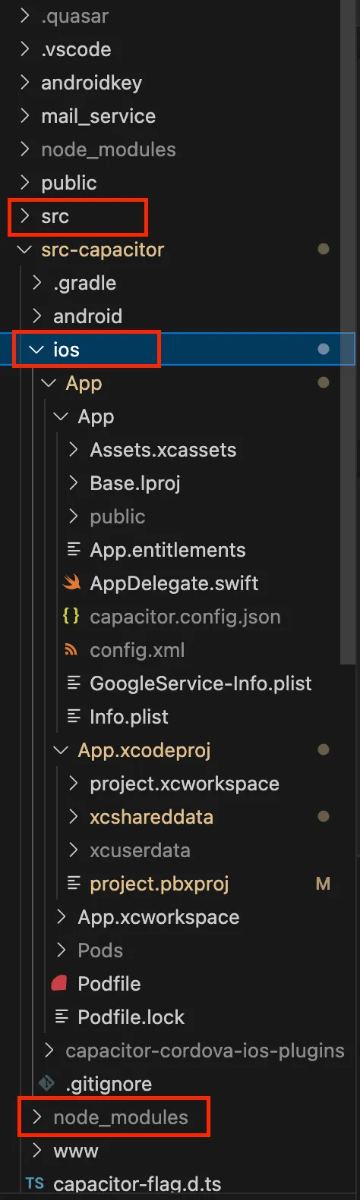
Screenshot by the author.
Why?
Vue.js code doesn’t run natively; it’s rendered inside a WebView.
The Vue.js interface runs on the WKWebView component on iOS and on the WebView component on Android.
The index.html, JS and CSS files that Quasar builds are copied into the native project and opened through the WebView.
This topic goes very deep technically, so I’d like to cover it in detail in another article. I’ll walk through how cross-platform apps actually work.
4. Add the iOS Platform If it hasn't Been Added Before
Now we're moving on to the iOS side. If you're adding iOS support to the project for the first time:
npx cap add iosThis command creates the necessary files for iOS and adds the src-capacitor/ios folder. If it's already added, you don't need to run it again to avoid errors.
5. Test in a Browser Before Moving on to Xcode
Now, let's test it in the browser before immediately moving on to iOS. Because if there's a Vue.js or Quasar-related error, we don't want to unnecessarily search for problems on the iOS side. The goal here is to ensure everything is correct and shorten our testing time before putting unnecessary strain on the iOS side. A quick break:
Enter the following command in the terminal:
Run your test in the browser and check the developer console (F12 / DevTools).
If it works in the browser and is error-free, we can move on to iOS.
Don't forget to enable Responsive Mode in Chrome to test in mobile view.
If you get an error, try to resolve it here first. Most errors are Vue.js or API related; it's much easier to resolve and debug them at this stage.
6. Synchronize Capacitor Changes.
iOS files have been added, but we need to transfer the Vue.js/Quasar changes in our project to Capacitor.
❌ Incorrect: Running this command in the project root directory will give an error:
npx cap sync iosIn this case, you will get the following error:
[error] ios platform has not been added yet.
✅ Correct: First, go to the src-capacitor directory, then synchronize:
cd src-capacitor
npm i
npx cap sync ios
📌 Why is this important?
The npm i command installs the Vue.js and Quasar dependencies in the project root directory, while also installing Capacitor's native dependencies in src-capacitor. This is why you see the node_modules folder in the src-capacitor directory in the screenshot below.
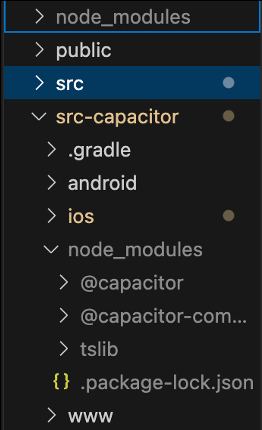
Screenshot by the author.
The
npx cap sync ioscommand copies the Vue.js build files tosrc-capacitor/ios/App/publicand includes them in the iOS application.If
npm iisn't run, some Capacitor plugin dependencies might be missing, and you might get an error during sync.
If you've added a new plugin (@capacitor/camera, @capacitor/push-notifications, etc.) or made any changes to Vue.js, you absolutely shouldn't skip this step.
If you're still getting errors, check the following:
Node.js dependencies might be missing; run
npm install.
Your Capacitor version might be outdated; update it with
npm install -g @capacitor/cli
On macOS, Xcode CLI tools might be missing; install them with
xcode-select --install
7. Install CocoaPods Dependencies to Avoid Xcode Errors.
Now, we need to run the CocoaPods system that Xcode uses to install iOS dependencies. If we skip this step, we'll get the " Device plugin is not implemented on iOS " error, as mentioned in this article. (Instead of Device, it could be another Capacitor plugin you recently added in Vue.js: like @capacitor/camera, @capacitor/push-notifications, etc.)
First, navigate to the iOS directory:
cd src-capacitor/iosCapacitor uses some dependencies to access native iOS features, and these dependencies are managed through CocoaPods. If you're using native features like Firebase, push notifications, camera, and storage on the iOS side, CocoaPods automatically includes these dependencies in the project.
If you skip or incomplete this step:
Xcode may give a " library not found " error during build.
Native features may not work.
The application may not open, remain on a white screen, or give an error due to missing frameworks on the iOS side.
Now install CocoaPods dependencies:
pod install --repo-updateIf CocoaPods are not installed, you may receive the following error: pod: command not found. In this case, you can install CocoaPods with the following command:
sudo gem install cocoapodsThen run the pod install --repo-update command again.
Once the CocoaPods installation is complete, we are ready to run it on iOS.
8. Run on iOS Simulator or Real Device
To run our Vue.js Quasar application in an iOS environment, we will use the following command:
quasar dev -m capacitor -T ios –livereload –externalThis command starts our Vue.js and Quasar project as an iOS application via Capacitor. Now let's explain each part of the command individually:
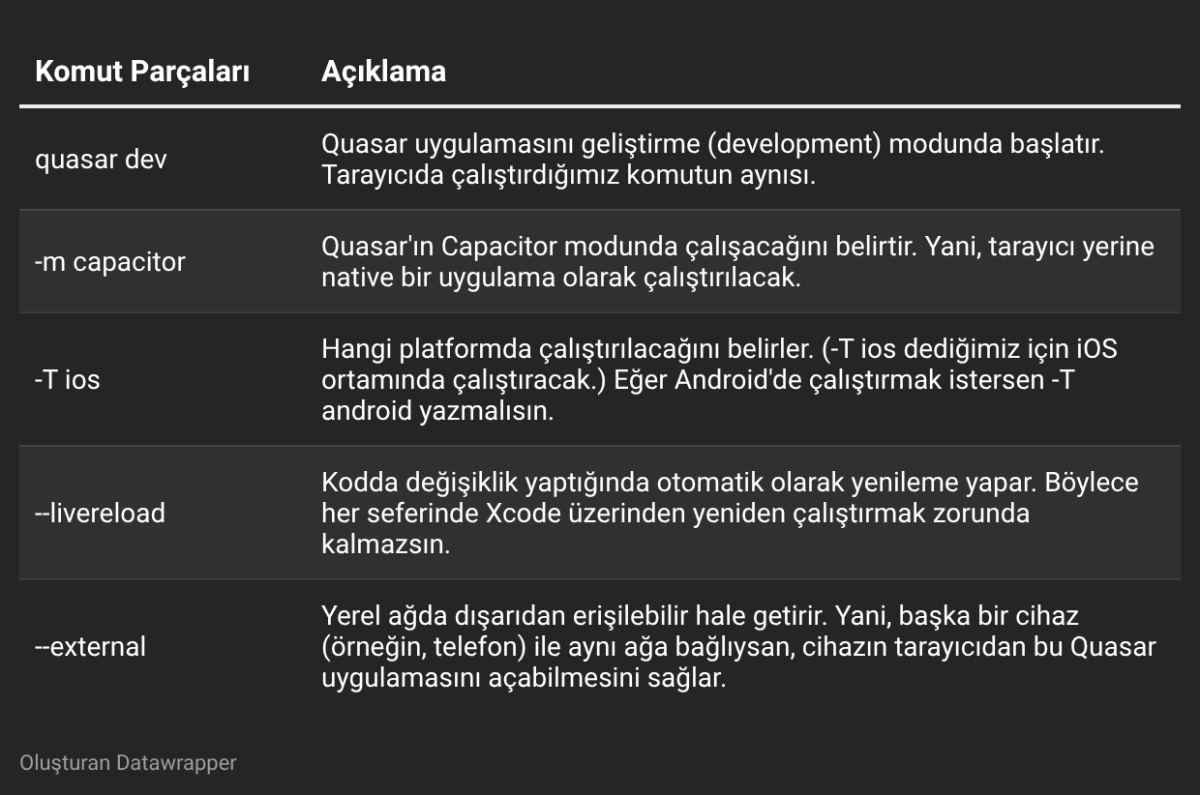
Table prepared with Datawrapper using the author’s data.
Simulator vs. Real Device: Which is Better?
You have two options for testing your iOS app: a simulator and a real device. So which is better? The answer depends on what you want to test. Let's examine the advantages and disadvantages.
Advantages & Disadvantages of Using an iOS Simulator
✅ Advantages:
Fast: Compiling and running the app is much faster than on a physical device because it uses the Mac's hardware.
Easy debugging: You can easily inspect Vue.js code and network requests with Safari's Web Inspector.
Can simulate different iPhone models: It's possible to test different devices such as the iPhone 14, iPhone SE, and iPad.
❌ Disadvantages:
Doesn't provide realistic performance: The simulator cannot accurately simulate slowdowns on real devices.
Cannot access hardware such as the camera, Touch ID, and Face ID: Hardware-based testing is not possible.
Features like push notifications might not work: If you want to receive notifications via APNs, you need to use a real device. During my tests, I saw notifications appear in the simulator, but I don't remember how I created that simulator. Normally, they shouldn't appear. :)
May not fully reflect real iOS UI behavior: Especially in tests related to animations and safe areas, the simulator may sometimes display inaccurate images.
Advantages & Disadvantages of Using a Real Device
✅ Advantages:
Real-world performance: You can detect the real speed and lag of the application.
Real touch and gesture tests can be performed: Gestures like swiping and long pressing can be tested.
Hardware features can be tested: You can try out hardware-requiring features such as the camera, Face ID, GPS, and compass.
Push notification, Firebase, and APN tests are possible: You can see if the notification systems are actually working.
❌ Disadvantages:
Requires working with Xcode settings: You need to configure settings such as the developer account, provisioning profile, and certificates.
Difficult to test on every device: You can't test different screen sizes unless you have different iPhone models.
Longer compilation time: The time it takes to load onto a real device may be longer than on the simulator.
Conclusion: Should You Use a Simulator or a Real Device?
🛠 During Development: Use the simulator, as it's faster and debugging is easier.
📲 For Final Testing and Performance Checks: Use a real device, as that's the only way to truly understand how the application works.
Pro Tip: The best approach is to use both. You'll get the best results if you quickly test code changes in the simulator and perform final tests on the real device.
Connect your iPhone to your Mac via USB.
Run the command
npx cap open iosSelect your device in Xcode and press the "Play" or "Run" button.
How does the command work?
This command launches the Quasar application directly in the iOS environment without manually opening Xcode or the simulator.
If an iPhone simulator is open on your Mac, it will run directly on the simulator. This raises the question: Simulator or real device? You're right, we thought of that too, buddy. 😊
If you have an iPhone connected via USB, you can use that to test on a real device.
It automatically refreshes with code changes; so you don't need to run `npx cap sync ios` every time.
Test Feedback and Solutions
If you've made it this far, it means we're talking about things that happen in real-world scenarios. Don't worry, every bug has a solution. We're solving it together! At worst, we'll just sit and cry together. 😊
In this section, I'll talk about bugs you might encounter while developing iOS applications using Vue.js, Quasar, and Capacitor, and their solutions. Our team has experienced these problems, and you might encounter similar ones. Luckily, I'm here with the solutions!
1. Some Buttons Not Working
In our Vue.js application, we noticed that some buttons weren't being clicked. Since iOS handles touch listeners differently, simply using @click might not be enough.
Solution: Catch touch events by adding @touchend
<q-btn label="Click" @click="handleClick" @touchend="handleClick" />Why?
@clickusually works flawlessly on desktop and Android devices.However, if
@clickand@touchendare used together, the browser might sometimes call the same action twice. To prevent this, you can use the following method:
<q-btn label="Click" @click="handleClick" @touchend.prevent="handleClick" />2. Buttons Hidden Under the Notch and Safe Area Issue
We noticed that some buttons were being covered by the notch at the top of the screen on iPhone X and later devices. This happened because we didn't pay attention to safe area rules.
Solution: Define a safe area with CSS
You can prevent the content from staying below the notch with the following CSS variables:
.safe-area {
  padding-top: env(safe-area-inset-top);
  padding-bottom: env(safe-area-inset-bottom);
}
For Vue.js / Quasar:
<q-header class="bg-primary text-white safe-area">
  <q-toolbar>
    <q-btn flat icon="menu" @click="toggleDrawer" />
  </q-toolbar>
</q-header>
3. Non-Responsive Components: Long Texts, Plains, Plateaus
We experienced page overflows because some texts were too long on mobile screens. When responsive design isn't done properly, texts and boxes may look fine on large screens but can look terrible on mobile. You need to be careful.
Solution: Using word-break and max-width
To prevent long texts from overflowing:
.text-container {
  max-width: 100%;
  word-break: break-word;
}
4. iOS-Specific Push Notification Error: Failed to Get Instance FirebaseID
We encountered a "Failed to get instance FirebaseID" error while testing push notifications on iOS. This is because iOS requires special permissions to receive notifications, and Firebase's delegate management on the iOS side can sometimes cause problems.
One of the errors we received was:
APNS device token not set before retrieving FCM Token for Sender ID. Notifications to this FCM Token will not be delivered over APNS. Be sure to re-retrieve the FCM token once the APNS token is set.
This error occurs because the iOS device cannot connect to the Firebase Cloud Messaging (FCM) server. iOS will not issue an FCM token without retrieving the APNS token, and therefore push notifications will not work.
Solution 1: Manually request push notification permissions
For Firebase push notifications with Quasar + Capacitor:
import { PushNotifications } from '@capacitor/push-notifications';

async function registerPush() {
  const permission = await PushNotifications.requestPermissions();
  if (permission.receive === 'granted') {
    PushNotifications.register();
  } else {
    console.error('Push Notification izni reddedildi!');
  }
}
Why?
On the iOS side, you need to manually request permission from the user for push notifications.
If you skip this step, you won't receive notifications.
Solution 2: Change the FirebaseAppDelegateProxyEnabled setting
In some cases, Firebase's own AppDelegate management and Capacitor's management can conflict. As a result, push tokens cannot be obtained and a "Failed to get instance FirebaseID" error occurs. To fix this, update your Info.plist file: Add the following to ios/App/App/Info.plist:
<key>FirebaseAppDelegateProxyEnabled</key>
<string>NO</string>
Why?
Firebase uses its own proxy delegate system for iOS, and sometimes it conflicts with Capacitor's push notification management.
By setting this to NO, we disable Firebase's own delegate management and ensure that push notifications work correctly.
Simulator vs. Real Device Tests: Situations Where Things Work in the Simulator but Fail on the Real Device
While everything worked perfectly in the simulator, we noticed that some API calls failed on the real device.
Solution: Check HTTPS requirements:
iOS does not allow insecure HTTP requests. If an API call fails, you most likely need to modify the NSAppTransportSecurity settings.
Add the following to the Info.plist file:
<key>BGTaskSchedulerPermittedIdentifiers</key>
    <array>
        <string>$(PRODUCT_BUNDLE_IDENTIFIER)</string>
    </array>
<key>NSAppTransportSecurity</key>
<dict>
    <key>NSAllowsArbitraryLoads</key>
    <true/>
    <key>NSAllowsArbitraryLoadsInWebContent</key>
    <true/>
</dict>
Publishing an iOS App: Xcode and Apple Developer Account Settings for Frontend Developers
To submit your iOS app to the App Store, you need an Apple Developer Program account. If you don't have an Apple Developer account, either individual or corporate, you can register at https://developer.apple.com/programs/. This requires a paid membership, and the approval process may take a few days.
✅ Connect your Apple Developer account to Xcode
Open Xcode and go to Xcode → Settings from the top menu.
Go to the "Accounts" section and sign in with your Apple ID.
After signing in, make sure your Apple Developer account appears under "Team".
✅ Set up project signature in Xcode
Open the iOS part of your project in Xcode: `npx cap open ios`
In the left panel of Xcode, click on the main "App" file.
Go to the "Signing & Capabilities" section.
Check the "Automatically manage signing" box.
Select your Apple Developer account from the “Team” section.
Make sure your Bundle ID is unique. For example: com.companyname.appname
App Store Requirements & TestFlight
You can follow these steps to test your iOS app via TestFlight and submit it to the App Store:
1. TestFlight testing process
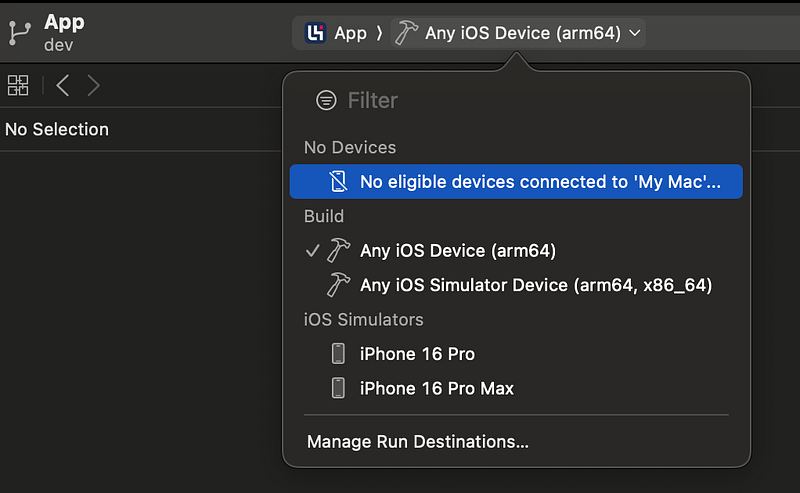
Screenshot by the author.
As you can see in the screenshot above, a physical device should not be selected; instead, a generic target such as iOS ARM64 should be chosen.
Start the “Archive” process for the application by following the path Xcode → Product → Archive, as shown in the screenshot below.
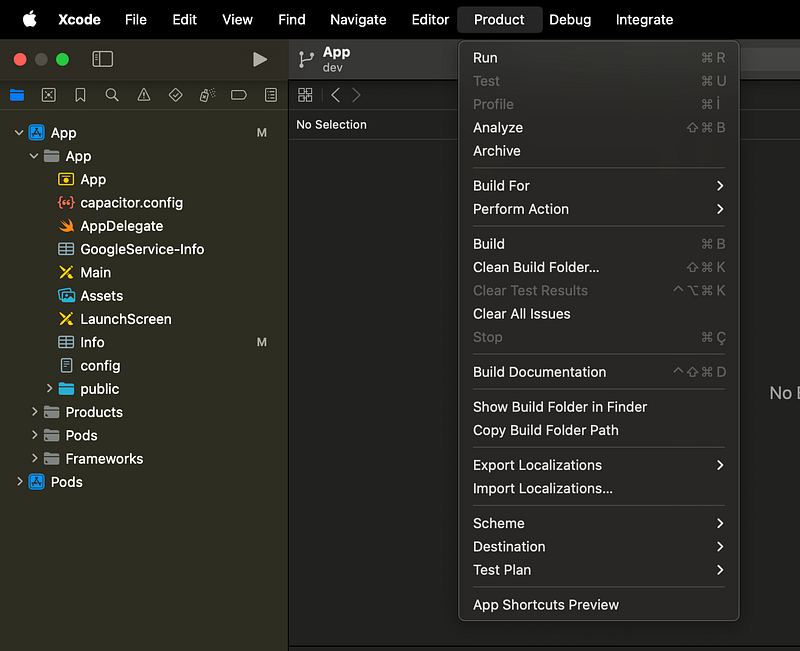
Screenshot by the author.
In the window that opens, select the “Distribute App” option and upload it via TestFlight. Note: Before “Distribute,” you can perform a “Validate” operation to test if there are any problems with the extracted file.
After the application is uploaded, you can start beta testing by logging into TestFlight via App Store Connect.
App Store Requirements & TestFlight
Make sure you add a suitable icon and splash screen for the App Store.
Create a page containing the application's privacy policy and terms of use.
Enter the necessary screenshots and descriptions in App Store Connect.
Check if it meets Apple's App Store review process.
Conclusion: If your goal is simply to run and test the application, you can proceed with TestFlight. However, to submit to the App Store, you must carefully follow Apple's requirements.
I can explain the App Store and TestFlight processes in more detail in a separate article.
My Dearest Team ❤️
During our time working together at Lebib Yalkın, my team and I experienced so many wonderful things… You only truly understand what team spirit means when you work together. There are moments when you struggle until dawn trying to fix a problem, rubbing your eyes in front of the screen and muttering, " The only way is revolution!" or "Duuuuude!" with a high-pitched voice stretching out the 'a's… Then someone comes along and pulls you out of that hole with a single line of code. That's the magic of being a team.
There's no problem we can't solve together, shoulder to shoulder…
What truly makes us valuable is that we solve things together. 💪 Because a team doesn't just write code; it supports, teaches, learns, motivates, and sometimes says, "You can do this!" and fires you up! That's exactly what my team is like.
Thank you so much, you wonderful people with pure hearts. I'm so proud of you.
Let me do a little self-criticism now: Could some of the bugs you read about above under the heading "Test Feedback and Solutions" have been found through developer testing? Yes, of course. 😅 Even though our Mac arrived late, we could have run it in the simulator beforehand and explored the application to identify these shortcomings. But the important thing is to learn from these mistakes and do better in the next project. Because development, gaining experience, and becoming a better team is exactly that kind of process. I have complete confidence in my team in this regard.
I will never forget the days in this project when we both went crazy and laughed together because of the bugs, and learned new things. I won't let anyone criticize my team! We write code, we solve problems, but most importantly, we solve them "together".
Thanks, my darlings.
Frequently Asked Questions
▸What software do I need to publish an iOS app with Capacitor and Vue.js?
You need a Mac with Xcode, VSCode, and Git installed. Pull your project via Git, open it in VSCode, and install Vue.js and Quasar dependencies using npm i.
▸How do I add iOS platform support to a Capacitor project?
Run npx cap add ios in your project directory. This creates the src-capacitor/ios folder with all necessary iOS files. Only run it once — repeating it can cause errors.
▸How do I install and update the Capacitor CLI?
Run npm install -g @capacitor/cli to install or update it globally. You can check the installed version with npx cap --version.
▸Why should I test in a browser before opening Xcode?
Testing with quasar dev in the browser first lets you catch and fix Vue.js or API errors early. It's faster to debug at this stage than to chase down issues on the iOS side.
▸How do I sync Capacitor changes for iOS?
Navigate to src-capacitor, run npm i, then run npx cap sync ios. This syncs your latest web build and plugin changes into the native iOS project.
▸How do I avoid CocoaPods errors in Xcode?
After syncing, navigate to src-capacitor/ios and run pod install --repo-update. This installs or updates native iOS dependencies and prevents common Xcode build errors.
▸How do I run my Capacitor app on an iOS simulator or real device?
Use quasar dev -m capacitor -T ios --livereload --external to run on a simulator. For a real device, run npx cap open ios, select your device in Xcode, and press the Run button.
▸Does this Capacitor guide apply to React or Angular apps too?
Yes. Since Capacitor is a framework-agnostic native bridge, most errors and solutions described here apply to Angular, React, Next.js, and other JS frameworks. Each framework may have its own Capacitor adapter package, but core issues are largely the same.
▸What does Capacitor actually do when running a Vue.js app on iOS?
Capacitor wraps your web app in a native WebView, so Xcode sees the iOS project directory (src-capacitor/ios) rather than the Vue.js source files. It acts as the middleware between your frontend code and the native platform.
▸What should I do if npm i doesn't resolve all missing dependencies?
Try running npm install --force or npm ci. These commands can resolve stubborn dependency issues that a standard npm i might miss.