
Opening 11 Million Character HTML in a Mobile WebView: Virtual Chunking
- First We Measured, Then We Understood
- "Break the Document into Parts"
- Problem: The Browser Keeps Everything in Memory
- Step 1: Cleverly Parsing HTML
- Step 2: Load as You Scroll Down
- Step 3: "Go to Article 47" - When Chunk Limits Are Exceeded
- Step 4: Changing Sections Among 11 Million Characters
- Step 5: Navigating Through Search Results
- Result: 227 Documents Recovered
Contents
- First We Measured, Then We Understood
- "Break the Document into Parts"
- Problem: The Browser Keeps Everything in Memory
- Step 1: Cleverly Parsing HTML
- Step 2: Load as You Scroll Down
- Step 3: "Go to Article 47" - When Chunk Limits Are Exceeded
- Step 4: Changing Sections Among 11 Million Characters
- Step 5: Navigating Through Search Results
- Result: 227 Documents Recovered

Image created by Gemini
“We’ll just redirect these 227 documents to the browser,” we said. Then, we decided to rescue the Turkish Commercial Law.
I've had a Xiaomi Redmi Note 9S for six years. This phone has done so much for me. It took beautiful photos and created many memories. I dropped it, got it wet; the battery swelled and needed replacing; it left me on Android 12. I wasn't really playing demanding games, and in normal use, it rarely froze or lagged. That is, until I tried to open the Turkish Commercial Code No. 6102 in our Vue.js-based Capacitor application.
The screen went black. I touched it, no response. I touched it again, still nothing. The phone started getting hot in my hand. The WebView main thread was suffocating; our native wrapper running a WebView was dying trying to process an 11 million-character HTML block.
The customer asked, "Why is this screen opening so slowly?" I didn't tell them the truth. Instead, I said, "Let's investigate."
First We Measured, Then We Understood
Instead of trusting intuition, we immediately opened the problematic documents on different devices. We told the team about the documents that were causing problems, and they tried them on their devices:
In the Turkish legal system, some foundational laws and regulations are massive, containing decades of amendments and nested structures (tables, definitions, etc.), leading to HTML files exceeding 11 million characters.
Even with normal applications, my phone would inevitably freeze, either when viewing the document change history or browsing through the changes. Once the situation became clear, the decision became clear: documents exceeding 1.5 million characters were risky. There are 227 documents in the system that exceed this threshold. The plan was simple: Instead of opening these documents in the application, redirect the user to the device's browser. Simple, low-risk, a half-hour job.
But feedback came from the sales team: This had been a complaint during a customer visit. "Opening documents outside the mobile application is unacceptable," they said.
I clearly stated: "Our devices don't have enough RAM. Even with a 1.5 million character document, the application freezes if the change history is full. I don't see any solution other than sending it to the browser. Even if we wrote a native application, we cannot guarantee the display of such a large and crowded HTML."
"Break the Document into Parts"
After a while, my manager, Yasin Ayata, said, "What if we split the document into parts and only rendered the part visible on the screen? Wouldn't that work?"
I replied, "Even though I said 'no, there's no way' that day, it had crossed my mind, and I was actually researching this."
Indeed, even before the word "I don't see any solution" left my mouth, I had already thought to myself, "How? There must be a way." There are thousands of threads on Reddit with very long comments: How do those pages open? There are hundreds of pages of forum threads on Donanimhaber(Turkey's oldest and largest tech forums); they contain tables, quotes, images, bold and italic texts… At some point, they must have encountered this problem and found a solution.
While shamelessly saying "no," I remembered that I had also worked at Donanimhaber for a while. It was my first job. I think it was 2016-2017. At that time, I was an Android developer. We received responses from web services in JSON format. I had never wondered how they stored the data in the database. I asked Yağız(Head of Software Engineering at DonanimHaber). It turns out the News side was storing content as HTML—but he wasn't serving it raw; he was running it through his own parser and delivering it to the mobile apps as JSON. We, however, were getting raw HTML from the API and didn't have the luxury of changing it. If we could’ve done what Yağız abi did, I wouldn't be writing this article today.
Reddit had already switched from HTML to JSON. In fact, they did it in the early 2010s.
The answer always boils down to the same philosophy: Render the content that is visible on the screen, keep the invisible content outside the DOM. This is the solution that all major platforms that store – or used to store – data in HTML have found. We arrived at the same conclusion.
Actually, this process was an adaptation of the technique known as "Virtual Scrolling" or "Windowing" in the modern frontend world, applied to a documentation-based and hierarchical HTML structure. At this point, our biggest enemy was TBT (Total Blocking Time). Trying to load 11 million characters into the DOM all at once would lock up the browser's main thread for minutes. We freed up the main thread by breaking this process down into smaller parts.
Problem: The Browser Keeps Everything in Memory
Let's start with the non-technical version.
When a web page opens, the browser keeps the entire page in memory. The section you scroll through, and the section you haven't seen yet, sits in RAM, waiting. If the page is small, there's no problem. But these documents aren't small: hundreds of <dfn> elements, hundreds of table rows, nested <div> s, decades of change history…
Come on, we're talking about the Republic of Turkey. There's no end to the changes in laws and regulations. With every touch, every scroll, the browser has to recalculate this massive tree. This is called "layout thrashing." It causes a physically noticeable sluggishness on a mobile device. My poor Xiaomi Redmi Note 9S phone is a witness to this.
Step 1: Cleverly Parsing HTML
First question: Where do you cut the document?
If you cut randomly or split every 10,000 characters, you leave open <table> tags, creating a broken
<div>hierarchy. The browser crashes.Why didn't we split with a simple split or regex? Because in HTML's notoriously poorly formed world, safely cutting nested
<div>or<table>structures with regex is much more difficult. Writing a flawless regex that applies to every part of an 11 million character document is truly, truly harder. I'm not saying impossible, mind you, we learned not to say impossible, even if it was the hard way.
To avoid disrupting the hierarchy between HTML tags, we used the browser's own parsing mechanism (DOMParser). We first standardized the document, then cut it at logical node points.
That's where DOMParser comes in. First, we parse the raw HTML using the browser's own engine: tag errors are corrected, and the tree is standardized. Then we traverse the top-level nodes. Each p, div, table, h1-h6 increments a counter. When it reaches 20, the block is cut. From now on, we will call blocks "blocks" instead of chunks.
async splitRawAsync(htmlString, chunkSize) {
  const parser = new DOMParser();
  const doc = parser.parseFromString(htmlString, 'text/html');
  const elements = Array.from(contentRoot.childNodes);let currentChunk = '';
  let paragraphCount = 0;
  let lastYieldTime = performance.now();
  for (const el of elements) {
      if (el.nodeType === 8) continue; // comment node'ları atla
      currentChunk += el.outerHTML || el.textContent;
      if (['P', 'DIV', 'TABLE', 'UL', 'PRE', 'H1', 'H2', 'H3'].includes(el.tagName))
        paragraphCount++;
      if (paragraphCount >= chunkSize) {
        chunks.push(currentChunk);
        currentChunk = ''; paragraphCount = 0;
      }
      // Her 50ms'de event loop'a nefes ver
      if (performance.now() - lastYieldTime > 50) {
        await new Promise(resolve => setTimeout(resolve, 0));
        lastYieldTime = performance.now();
      }
    }
  }
...
}
JavaScript runs in a single thread. Think of a thread as a single-lane road. Both the application code and the browser's "draw screen" command move sequentially along this road; they cannot go side-by-side.
When the parsing process begins, it completely closes this path. The browser, wanting to draw the "Please wait…" spinner, is waiting in the background but cannot pass. The user touches the screen, there is no response. The screen appears frozen.
setTimeout(resolve, 0) says: "I am now leaving the path and moving to the end of the queue." In that brief moment, the browser can enter the path: The spinner is drawn, and touches are responded to. Then the parsing process continues from where it left off.
With performance.now(), we perform this "leaving the path" operation every 50 ms. If you do it too often, the parsing will slow down; if you don't do it at all, the screen will freeze. 50 ms is the balance point between these two.
Here we made a critical CS choice: We stored the 11 million characters of data as a String in the rawChunks array, not as a DOM Node. Storing data as a string takes up much less RAM, and rendering it to the DOM only when needed significantly reduces the document's total memory footprint.
When creating blocks, we simultaneously check three things: Are there elements with colored backgrounds (coloredChunks), are there <mark> (markChunks), and are there <pre> (preChunks)? These lists become the backbone of navigation in subsequent steps.
Step 2: Load as You Scroll Down
The blocks are ready. Now the question we need to ask is: How will the application know where it is scrolling, and when will it load a new block? The answer: sentinel div. We place an invisible div at the very bottom of the content. IntersectionObserver monitors this div - but it's triggered 1000px before going full screen, not when the user reaches the end. Loading starts and even finishes before the user gets close, and the user doesn't even notice if they scroll quickly. The heights of the spacer divs are adjusted accordingly so that the scroll bar length remains realistic.
setupObservers() {
  this.bottomObserver = new IntersectionObserver((entries) => {
    if (entries[0].isIntersecting && this.visibleEnd < this.rawChunks.length) {
      this.renderBottom(4); // 4 chunk daha DOM'a ekle
    }
  }, { rootMargin: '1000px 0px 1000px 0px' })
  this.bottomObserver.observe(this.$refs.bottomSentinel)
}
A note for the next developer: We tried top trimming – removing invisible blocks from the DOM when scrolling up. On mobile, momentum scrolling broke and the screen flickered. We removed it. We added a note to the code comment: " Top trimming was intentionally removed for smooth mobile scrolling. " Of course, we also tested scrolling all the way down and back up, and there were no problems.
Step 3: "Go to Article 47" - When Chunk Limits Are Exceeded
Okay, we've done the normal scrolling flow, it's working. Good job me. Now, imagine our interface, there's a panel on the left of the document. This panel has the document's list of items, buttons to go to the changed section, a button to go to all changes... and so on. When you click on an item, you should scroll there. It looks easy. It's not.
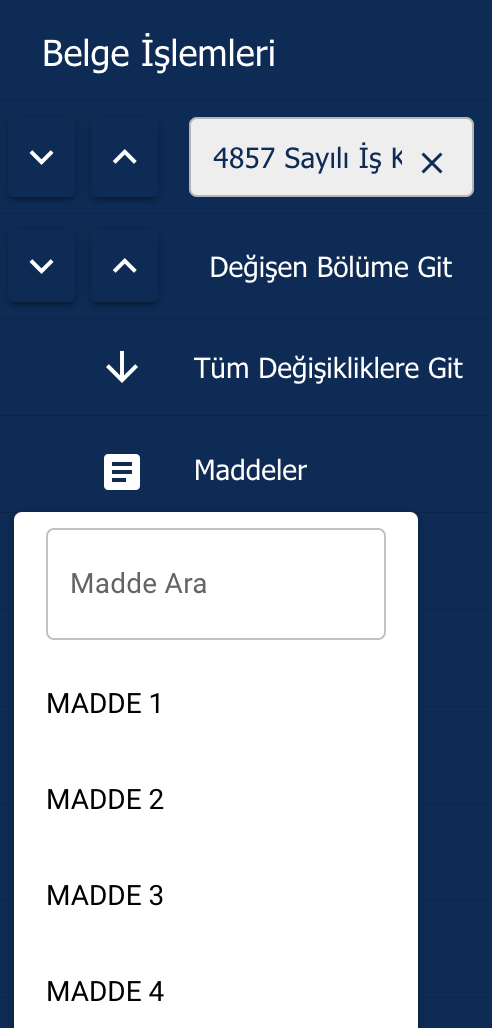
Screenshot by author.
Problem: The clicked item or the desired change may not yet be in the DOM. Only the first two chunks are loaded when the page is published. Item 47 might be in chunk 12. First, we search for the ID or text within rawChunks, load the chunk it's in, and then scroll smoothly.
handleMaddeStart(targetElement) {
  // Önce DOM'da ara
  const el = document.getElementById(targetElement.id);
  if (el && document.contains(el)) {
    window.scrollTo({ top: el.getBoundingClientRect().top + window.scrollY - 95 });
    return;
  }
// Hangi chunk'ta bu ID var?
  const chunkIndex = this.rawChunks.findIndex(chunk =>
    chunk.includes(`id="${targetElement.id}"`) ||
    chunk.includes(targetElement.textContent.trim())
  );
  if (chunkIndex !== -1) {
    this.isNavigating = true;
    this.ensureChunkRenderedAndScroll(chunkIndex, () => {
      const found = document.getElementById(targetElement.id);
      if (found)
        window.scrollTo({ top: found.getBoundingClientRect().top + window.scrollY - 95 });
    });
  }
}
Craftsmanship sometimes lies not in the code, but in understanding the device's instincts. We noticed that iOS WebView (Webkit) doesn't fully stabilize the DOM layout until the drawer animation is finished. Therefore, we increased the waiting time from 50ms on Android to 350ms on iOS, providing the user with that smooth transition.
Step 4: Changing Sections Among 11 Million Characters
In our system, changes in legal texts are marked with color highlighting: yellow, red, cyan. When you click "Go to the changed section," you have to navigate through these elements sequentially. Not all elements are present in the DOM at the same time. Solution: the buildColoredItemsBackground browser, which runs silently in the background after the page loads.
async buildColoredItemsBackground() {
  for (let chunkIdx = 0; chunkIdx < this.rawChunks.length; chunkIdx++) {
    const renderedEl = this.$refs.chunksEl?.querySelector(`[data-chunk-idx="${chunkIdx}"]`);
    if (renderedEl) {
          // DOM'da: elementleri tag'le, rawChunks'ı güncelle
          Array.from(renderedEl.getElementsByTagName("*")).forEach(el => {
            if (checkBg(el)) {
              el.setAttribute('data-colored-idx', String(coloredCounter));
              coloredItems.push({ chunkIdx, coloredIdx: coloredCounter++ });
            }
          });
          this.rawChunks[chunkIdx] = renderedEl.innerHTML;
        } else {
          // Henüz render edilmemiş: DOMParser ile parse edip tag'le
          const doc = parser.parseFromString(this.rawChunks[chunkIdx], 'text/html');
          Array.from(doc.body.getElementsByTagName("*")).forEach(el => {
            if (checkBg(el)) {
              el.setAttribute('data-colored-idx', String(coloredCounter));
              coloredItems.push({ chunkIdx, coloredIdx: coloredCounter++ });
            }
          });
          this.rawChunks[chunkIdx] = doc.body.innerHTML;
        }
        if (chunkIdx % 5 === 4)
          await new Promise(resolve => setTimeout(resolve, 0));
      }
    }
In the end, we have a map like this: [{ chunkIdx: 3, coloredIdx: 0 }, { chunkIdx: 12, coloredIdx: 1 }]. Clicking "Next change" takes us one step forward on the map. If the target chunk hasn't been rendered, we load it, find the element using data-colored-idx, and scroll. Once all changes are complete, the question "Would you like to return to the top of the page?" appears.
Step 5: Navigating Through Search Results
There is a search bar in the left panel. The term is highlighted with a <mark>, and you can navigate between matches using the forward/backward buttons. What happens if the next <mark> is in a chunk that hasn't been rendered yet?
handleSearchStart(upOrDown) {
  const marks = Array.from(this.$refs.chunksEl.getElementsByTagName("mark"));
  const currentOffset = window.scrollY + 185;
  if (upOrDown) {
    const targetMark = marks.find(m =>
      m.getBoundingClientRect().top + window.scrollY > currentOffset + 10
    );
    if (targetMark) {
      window.scrollTo({ top: targetMark.getBoundingClientRect().top + window.scrollY - 185 });
      this.isNavigating = false;
    } else {
      // DOM'da yok: markChunks listesinde sonraki chunk'u bul ve yükle
      const nextChunkIdx = this.virtualNavData.markChunks.find(idx => idx >= this.visibleEnd);
      if (nextChunkIdx !== undefined) {
        this.ensureChunkRenderedAndScroll(nextChunkIdx,
          () => this.handleSearchStart(true) // chunk yüklenince tekrar dene
        );
      }
    }
  }
}
There's a recursive call, but it's guaranteed to terminate: the markChunks list is running out. After the last match, a "back to top" notification appears.
Result: 227 Documents Recovered
Looking back at the time from when I said "There's no other solution" to the moment when the Turkish Commercial Code No. 6102 opened smoothly in practice, I see this: Sometimes when you say "there's no solution," you're actually saying "I haven't found the solution yet."
Donanımhaber somehow managed to open its forum thread with hundreds of pages. Reddit managed its topics with thousands of comments. They also faced the same questions and reached the same philosophy. We did too.
The 11.5 million character Customs Decision now opens in the application. 227 documents were not redirected to the scanner, they remained in the application. With notes, item navigation, search and changing section access features…
My 6-year-old Xiaomi Redmi Note 9S no longer freezes. It won't freeze until it retires. I can easily see and examine our laws and the changes made. As I do the steps, I think I won't be able to do the next step, that the phone will eventually lag again; I ask the teams within the company, "Couldn't it be better if there wasn't a feature to make these changes on mobile as well?" I was preparing sweet little explanations and questions like that, but it turned out I didn't need them. I just kept doing it, I was able to do it.
Especially the "Document Comparison" screen we developed, which allows users to clearly see which lines have been changed when comparing the document with previous versions... Multiply everything I've described so far by two. This screen was the ultimate achievement. Rendering two different 11 million-character documents side-by-side and maintaining scrolling synchronization without disrupting performance was the biggest proof of how scalable our "Virtual Chunking" structure is.
A scenario where there's no solution in the software is truly very difficult. Of course, the team doesn't have enough resources; the company's priorities are on other projects, other tasks. We have endless respect for such strategic decisions. Otherwise, it's really important not to say it's impossible. We learned that too.
If you went to research IntersectionObserver, DOMParser, or the concept of "giving a breath to the event loop," then this article has achieved its purpose.
Frequently Asked Questions
▸Why does a large HTML file crash a mobile WebView?
When a WebView loads HTML, it keeps the entire document in memory and recalculates the full layout tree on every scroll or interaction. An 11 million character document with hundreds of nested tables, divs, and definitions causes layout thrashing and locks the main thread, making the app unresponsive and the device hot.
▸What is virtual chunking in the context of HTML documents?
Virtual chunking is an adaptation of the 'virtual scrolling' or 'windowing' technique applied to large HTML documents. Instead of loading the entire document into the DOM, only the portion visible on screen is rendered, keeping invisible content outside the DOM to reduce memory usage and main thread load.
▸What is Total Blocking Time (TBT) and why does it matter here?
TBT is the time the browser's main thread is blocked and unable to respond to user input. Loading 11 million characters into the DOM all at once can lock the main thread for minutes. Breaking the process into smaller chunks frees up the main thread and keeps the app responsive.
▸Why can't you split a large HTML file using simple regex or character count?
Splitting HTML at arbitrary character positions or with simple regex risks cutting through open tags, leaving unclosed tables or broken div hierarchies that crash the browser. HTML's deeply nested and often poorly formed structure makes safe splitting with regex extremely difficult at scale.
▸What threshold did the team use to identify problematic documents?
Documents exceeding 1.5 million characters were identified as risky. There were 227 documents in the system that exceeded this threshold, with the worst cases reaching over 11 million characters.
▸Why was redirecting to the device browser rejected as a solution?
The sales team reported that opening documents outside the mobile application was unacceptable to customers. The product requirement was that all documents must open within the app, ruling out the simpler browser-redirect approach.
▸How do large platforms like Reddit handle massive HTML content on mobile?
Reddit migrated from raw HTML to a JSON-based content format in the early 2010s. The common philosophy across major platforms is to render only what is visible on screen and keep invisible content outside the DOM, which is the same principle behind virtual scrolling.
▸What is layout thrashing and how does it affect mobile performance?
Layout thrashing happens when the browser repeatedly recalculates the positions and sizes of elements in a large DOM tree. On mobile devices, this causes physically noticeable sluggishness with every scroll or touch interaction, especially in documents with complex nested structures.
▸Where should you cut an HTML document to split it safely?
The post indicates cuts must be made at safe block-level boundaries rather than at arbitrary character positions. Cutting mid-tag or inside nested structures like tables or divs creates broken HTML that the browser cannot render correctly.
▸What technology stack was the app built on?
The application was built with Vue.js and Capacitor, running as a native wrapper around a WebView on mobile devices.