What is Vuex and What Design Patterns Does It Use?
- What Exactly Are We Doing? What Is Mevbank Neo?
- How Do Legal Changes Get Added to Mevbank Neo?
- Why Do We Need State Management Tools in Software?
- What Is Vuex?
- Core Concepts of Vuex:
- What is a Design Pattern?
- Which Design Patterns Does Vuex Use?
- 1. Observer Pattern:
- 2. Singleton Pattern:
- 3. Module Pattern:
- 4. Façade Pattern:
- 5. Command Pattern:
- Observer Design Pattern
- Conclusion:
Contents
- What Exactly Are We Doing? What Is Mevbank Neo?
- How Do Legal Changes Get Added to Mevbank Neo?
- Why Do We Need State Management Tools in Software?
- What Is Vuex?
- Core Concepts of Vuex:
- What is a Design Pattern?
- Which Design Patterns Does Vuex Use?
- 1. Observer Pattern:
- 2. Singleton Pattern:
- 3. Module Pattern:
- 4. Façade Pattern:
- 5. Command Pattern:
- Observer Design Pattern
- Conclusion:
Image prepared by Canva and with logo
In a previous post, I talked about how I made a big leap to a completely different sector, with a completely different stack of technology, and took on a completely different role. I used to be a Native Android Developer, but now I’m leading a team that develops using Vue.js and Quasar. I didn’t just learn about sprint planning, agile methodologies, and leadership — I also learned Vue.js from scratch, and even started writing database functions! As of now (September 2024), I’ve been here for 8 months.
What Exactly Are We Doing? What Is Mevbank Neo?
I’m writing this paragraph to give a collective answer to everyone who asks me, “What do you do at a law firm?” Following laws, decrees, regulations, and similar legal rules is tough in our country due to frequent legislative changes and the complexity of the legal system. It’s also necessary to keep businesses running smoothly without any legal interruptions.
Mevbank Neo is a website that offers access to 10 million case laws, expert articles, and updates from the Official Gazette. In simpler terms, it’s a web-based application that allows you to search through big data, see the content of documents, and track when they were last updated. This helps companies adjust their work to the current laws, improving their work quality, reliability, and efficiency.
How Do Legal Changes Get Added to Mevbank Neo?
Our law team is responsible for tracking legal changes from the Official Gazette and similar government websites, and adding them to the system. Previously, these changes were manually entered using a desktop app that had been around for a while. Since that app was getting a bit old and no longer meeting our needs, we decided it was time for an upgrade.
We planned to write the new data entry project using Vue.js. One of the greatest strengths of Vue.js is its component-based structure. The best way to avoid long blocks of code is by breaking them down into smaller, independent pieces that follow SOLID principles. Of course, we needed a state management library to manage the connections between these components, and that’s how we started using Vuex, the state management library for Vue.js.
Why Do We Need State Management Tools in Software?

Photo by Piotr Makowski on Unsplash
Data Consistency: When multiple components in an application deal with the same data, that data needs to be managed in a consistent way. State management tools ensure that all components are updated from the same source.
Trackability: These tools make it easy to track and record changes in the application’s state, which helps with debugging and understanding how the app works.
One-Way Data Flow: State management tools often follow the principle of one-way data flow, which means that data moves in only one direction. This makes it easier to track and manage the application’s state.
Clean and Maintainable Code: Centralized state management makes the code more modular and easier to maintain, as state changes are handled in one place, reducing dependencies between different parts of the code.
Performance: These tools can help optimize performance by notifying only the relevant components about state changes, avoiding unnecessary re-renders of the entire page.
Large and Complex Applications: As an application grows, state management becomes more challenging. These tools offer scalable solutions to manage this complexity.
Separation of UI and Business Logic: State management tools make it easier to separate user interface (UI) from business logic, allowing UI components to focus on visual representation, while business logic is managed centrally.
After facing various challenges in projects that didn’t use any state management tools, I was convinced that we needed a state management tool in this new project. I knew that my eyes wouldn’t be able to handle the complex, thousands-of-lines-long components in a project that we were starting from scratch, especially as the team leader. If we didn’t keep the code clean and organized, I wouldn’t feel successful in bringing a new perspective and understanding to the team in my first leadership experience.
One day, I decided to explain Vuex to my colleagues and thought about where to start. I asked them if they had learned about design patterns in university. When I found out they hadn’t, I decided to start with that, knowing they were people who loved developing themselves and learning new things. We first talked about design patterns, then Vuex, and finally the design patterns within Vuex. Since the training was well-received, I decided to write this article you’re reading now.
As someone with years of experience as an Android developer, I’m obviously familiar with the various tools and libraries used for state management in Android. ViewModel, SharedViewModel, LiveData, StateFlow, MutableStateFlow, UnidirectionalDataFlow (Compose)… Vue.js also mentioned a few of these, but Vuex was the favorite.
In the data entry project, there was a component with a rich text editor,
On the right side of the rich text editor, there was a document properties component, where filter criteria for the search page in Mevbank Neo would be entered,
Along with the components I mentioned earlier, there was a new document page (classic CRUD create) with more general settings like the “save” button and the title input,
And finally, there was a popup to get the required inputs for the new document page before the page opened…
By the very first day of the project, there were already four different components that would either update or use the new document variable, which would be stored in the state management library. The number of these components grew later on. I’ll stop here to avoid making the article too long and to avoid revealing confidential information. I’m also considering writing a few more articles about the rich text editor we used.
If we had tried to do this without a state management library, we would have been constantly passing data using “props” and “watchers” across at least four components. The changes in one would have to be instantly communicated to all others, and the page would need to update simultaneously. This would result in a lot of boilerplate code.
What Is Vuex?
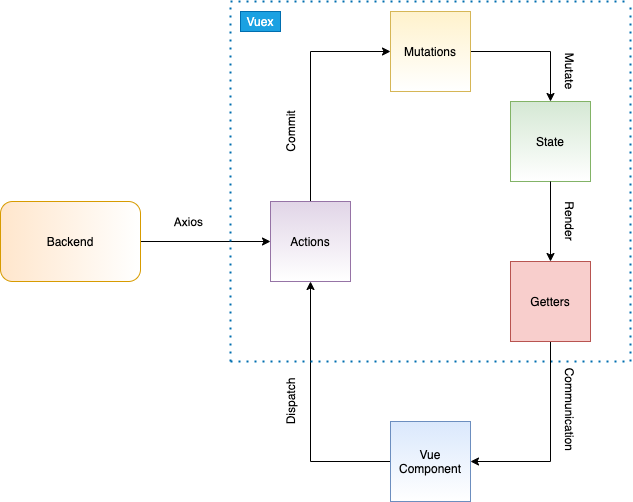
Graph prepared by author
Vuex is a state management library designed for Vue.js applications. Vuex provides a centralized state store that is shared across all components of the application and imposes certain rules for managing this state. This centralized structure makes data sharing and synchronization between components easier, especially in large and complex Vue.js projects.
Core Concepts of Vuex:
State: This is where the centralized state of the application is stored. Vuex manages the state from a single place, accessible to all components.
Mutations: This is where the state is modified. Mutations are the only place in Vuex where the state can be changed, and changes occur synchronously. Each mutation has a name and can take a “payload” as a parameter.
Actions: These are operations that trigger mutations. Actions are typically used to handle asynchronous tasks (such as an API call). Once actions are completed, they update the state via mutations.
Getters: Getters are used to process the state before using it in components or to get computed values. Getters provide a derived state.
Modules: In large-scale applications, you can split the Vuex store into modules to make it more manageable. Each module can have its own state, mutations, actions, and getters, and may even contain sub-modules.
Setting up Vuex is simple as follows:
// src/store/index.js
import { createStore } from "vuex";

const store = createStore({
  state: {
    article: {
      title: null,
      content: null
    }
  },
  mutations: {
    updateArticle(state, newArticle) {
      state.article = { ...state.article, ...newArticle };
    }
  },
  actions: {
    updateArticle({ commit }, newArticle) {
      commit("updateNewArticle", newArticle);
    },
  },
  getters: {
    newArticle(state) {
      return state.newArticle;
    }
  }
});

export default store;// src/boot/store.js
import { store } from "quasar/wrappers";
import storeConfig from "src/store";
export default store((/* { ssrContext } */) => {
return storeConfig;
});// Any vue file
<template>
<div v-model="newArticle.title"/>
</template>
import { mapState } from "vuex";
.
.
.
computed: {
...mapState(["newArticle"]),
},// quasar.config.js
boot: ["axios", "store"],What is a Design Pattern?
To keep the flow of the article, I need to provide a brief definition of design patterns. However, since there are so many resources, even entire books on this topic, I’ll keep it short to avoid making the article too long and straying from the main subject.
A design pattern is a well-defined and proven method that provides solutions to recurring problems in software development processes. Instead of rediscovering solutions to previously encountered problems, developers can use these patterns to produce more structured and sustainable solutions. Design patterns aim to improve the readability, reusability, and maintainability of code in software projects.
Which Design Patterns Does Vuex Use?

Photo by Cassi Josh on Unsplash
When I discovered Vuex, I realized that it was more than just a state management tool. As I researched what it really was, I became curious about the design patterns it used. A developer working with Vuex unknowingly uses the following design patterns:
1. Observer Pattern:
Vuex provides reactive state management. Vue components “observe” changes in the state and update themselves accordingly.
2. Singleton Pattern:
The Vuex store is used as a single instance throughout the application, and state management is handled through this instance. This ensures centralized state management.
3. Module Pattern:
Vuex allows the state to be organized into modules in large applications. Each module can have its own state, mutations, actions, and getters, making the code more modular and manageable.
4. Façade Pattern:
Vuex hides the complexity between Vue components and state management, providing a simpler interface. Components interact with the state through Vuex without dealing with the details of state management.
5. Command Pattern:
In Vuex, actions modify the state through mutations. Actions contain asynchronous operations and business logic, while mutations directly handle state changes. This structure is similar to the command pattern.
Among the design patterns used by Vuex, the Observer pattern is particularly popular and frequently asked about in job interviews. It’s a pattern that developers must know. Now, let’s take a closer look at the Observer design pattern.
Observer Design Pattern
This design pattern establishes a relationship between objects where one object is updated in response to changes in another. Simply put, when a change occurs in a subject (object), other objects (observers) that are “subscribed” to that subject are notified of the change and update themselves accordingly.
Think of it this way: when you subscribe to a news website, you get a notification when a new article is published. The news website is the “subject,” and you are in the “observer” role. For each new article, you automatically receive a notification, meaning you are “observing” an event.
This pattern is made up of three key parts:
Subject: The object being observed for changes. In the example above, the newArticle variable is the subject.
Observer: The objects that are notified of changes in the subject. In the example above, the Vue files or components that use newArticle.
Notify: The subject sends a notification to its observers whenever a change occurs.
This structure is used to build reactive systems in applications. For example, no matter how many places we update the newArticle variable, the data and the screen will always remain stable and up-to-date. Here’s an example of how the Observer design pattern is used with Vuex:
// state in Vuex store
const store = createStore({
  state: {
    newArticle: {
      title: '',
      content: ''
    }
  },
  mutations: {
    updateArticle(state, article) {
      state.newArticle = article;
    }
  }
});

// Vue dosyasındaki component
export default {
  computed: {
    ...mapState(['newArticle'])
  },
  watch: {
    newArticle(newVal) {
      console.log('Article updated:', newVal);
    }
  }
};
The traffic light example is a commonly used and easy-to-understand way to explain the Observer design pattern. In this example, the traffic light plays the role of the subject (object), while the passing cars act as observers.
The traffic light (subject) changes its color at regular intervals (red, yellow, green). When the color changes, the passing cars (observers) observe this change and act accordingly. For example:
When it turns red, cars stop.
When it turns green, cars move.
When it turns yellow, cars slow down and prepare to stop.
When the traffic light changes, both cars and pedestrians are instantly notified of the change and react accordingly.
In an e-commerce website, when a customer adds an item to the cart, the state of the cart (subject) changes. In this case, different components connected to the cart (observers) react immediately to the cart’s update. For example, when a user adds an item to the cart, the cart component updates the item count and total price, and the checkout page shows the new total immediately.
Additionally, the stock level is checked, and the stock page is updated to reflect the reduced quantity. This is a typical use of the Observer Pattern: when the cart changes, all components that are aware of this change react, and the interface is automatically updated.
Conclusion:
Vuex and the design patterns it incorporates provide an efficient and sustainable structure for large and complex Vue.js projects. Particularly, patterns like the Observer play a crucial role in ensuring a reactive and consistent flow of data within applications. Vuex’s centralized state management guarantees data consistency while making data sharing between components easier. This structure also makes the code more modular, understandable, and easier to maintain.
Design patterns offer ready-made solutions to common challenges in the software development process, allowing developers to use proven methods. The Observer pattern, in particular, simplifies data flow and component updates in modern applications. The benefits Vuex provides by using these patterns become even more noticeable in large-scale projects and team-based work. When building a component-based structure, correctly managing state and data flow not only speeds up the development process but also makes future changes easier to implement.
In conclusion, the design patterns within Vuex act as building blocks that simplify the work for both developers and teams. Using a state management tool like Vuex makes projects scalable and builds the software architecture on solid foundations. Therefore, understanding and correctly using design patterns not only in Vue.js projects but also in general software development processes helps developers create higher-quality, sustainable, and performant applications.
Frequently Asked Questions
▸What is Vuex?
Vuex is a state management library designed for Vue.js applications. It provides a centralized store shared across all components and enforces specific rules for how state can be read and changed.
▸What are the core concepts of Vuex?
The core concepts are State (where app-wide data lives), Mutations (the only place state can be changed, and only synchronously), Actions (which commit mutations), Getters (computed values from state), and Modules (for splitting the store in large apps).
▸Why do Vue.js applications need a state management tool like Vuex?
As applications grow, sharing data between many components becomes complex and error-prone. Vuex solves this by managing all state from a single centralized place, making data sharing easier and ensuring consistency across the app.
▸Which design patterns does Vuex use?
Vuex uses five design patterns: Observer, Singleton, Module, Façade, and Command. Developers apply these patterns automatically just by working with Vuex, even without realizing it.
▸How does Vuex use the Observer pattern?
Vuex provides reactive state management, meaning components automatically react to state changes. When state updates, any component watching that state (via computed properties or watchers) is notified and re-renders accordingly.
▸How does Vuex use the Singleton pattern?
The Vuex store is created as a single instance shared across the entire application. All components access and modify state through this one instance, preventing duplicate or conflicting stores.
▸How does Vuex use the Module pattern?
In large-scale applications, Vuex allows the store to be split into modules. Each module can have its own state, mutations, actions, and getters, making the codebase more organized and manageable.
▸How does Vuex use the Façade pattern?
Vuex acts as a simplified interface between Vue components and the underlying state management complexity. Components interact with state through Vuex without needing to know the internal details of how state is managed.
▸How does Vuex use the Command pattern?
In Vuex, actions serve as commands that trigger mutations to modify the state. This separates the instruction to change state from the actual change, keeping logic organized and traceable.
▸Which Vuex design pattern is most commonly asked about in job interviews?
The Observer pattern is highlighted as the most popular and frequently asked about in job interviews. It underpins Vuex's reactive state management, where components automatically respond to state changes.
▸How do you set up a basic Vuex store?
You create a store using createStore() with state, mutations, actions, and getters defined inside it. You then register the store in the app's boot or entry file, and access state in components using mapState or the Vuex composable APIs.
▸What are the benefits of using Vuex in large projects?
Vuex guarantees data consistency, simplifies data sharing between components, and makes projects scalable. Its built-in design patterns provide a solid architectural foundation that benefits both individual developers and teams.