
Higher-Order Functions in Kotlin: Cleaner Android Code Without Duplication

Image designed by Author on Canva
Since 2010, when Oracle acquired Sun Microsystems, there has been an ongoing Java war between Oracle and Google. Oracle filed a significant lawsuit against Google, accusing it of using Java’s non-free features without payment, and so on… You might know the story, I suppose there’s no need to recount it all. At the GoogleIO 2017 event, Kotlin was declared the official programming language by Google. Since that day, we, as Android developers, have been learning Kotlin.
You might have heard many Kotlin and Android enthusiasts, including myself, say, ‘Kotlin has functional language features.’ If you’re asking, ‘What are these functional language features? Give me an example, come on!’ then gather around. In this article, I will explain the use of high-level functions, one of Kotlin’s functional language features.
In the world of functional programming, functions get the VIP treatment — they’re considered just as crucial as other types like Strings or Integers. In the literature, this is known as being first class. What’s cool is that you can actually pass functions around just like you would with a String or an Integer. This opens up possibilities where functions can receive other functions as parameters or even return them.
Take Kotlin, for example. Unlike Java, Kotlin doesn’t force functions to be tied down inside classes. This freedom allows for what we call high-level functions. These are essentially functions that can manipulate or produce other functions, which can really help streamline some of the more complex coding tasks. It’s a natural fit for Kotlin and something that sets it apart in functional programming. Plus, you can stash functions in data structures and variables, treating them like any regular piece of data.
Let me show you why higher-order functions are a big deal in Kotlin. I’ll start with a straightforward example to break it down, and then I’ll demonstrate how this can be super useful in Android development. Ready to dive in? Here’s a basic way to set up a function that can take another function as a parameter:
fun passMeFunction (text: String, function: ( ) -> Unit) {
    // do something
    // execute the function
    function()
}passMeFunction ( “text” ) { print ( it ) }
passMeFunction ( “text” ) { s -> print ( s ) }
passMeFunction ( “text” , { print ( it ) } )
passMeFunction ( “text” , { s -> print ( s ) } )
passMeFunction (“text”, ::print ) // KISS : Keep It Small Stupid hell yeeaaHonestly, I didn’t even realize I needed this feature until I started using it. Once I began, I understood that I could use higher-order functions in many places. Especially when writing a project of medium or larger scale, you often need the same piece of code in other Activities, Fragments, and classes. For example, the action of deleting a user can be performed both from the user list and the user detail page. However, if you start copy-pasting, as the project progresses, you might drown in a sea of redundant code, produce junk code, and make code management unnecessarily difficult.
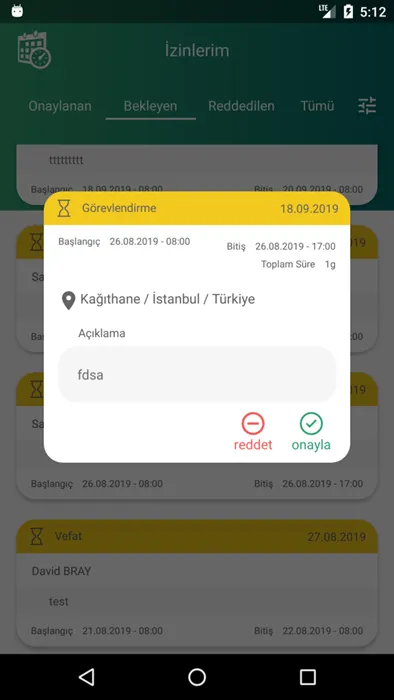
Screenshot taken by the author.
Coming to a real-life example:
At Peakup, we developed an Android app known as Leave Management. It’s designed to let employees swiftly request and monitor their leaves while giving team leaders and HR staff a straightforward way to handle everything. During the development of this app, I ran into an issue:
I realized I was writing nearly the same function for deleting, approving, and rejecting leaves, resulting in unnecessary code repetition. In all three operations, I would first close the leave detail DialogFragment, then display a dialog asking, “Are you sure you want to delete/reject/approve?” When the user touched the confirm button, I would send a request to the backend via the respective function. When I noticed the redundant code, the Higher Order Function feature came to mind because only the text in the Dialog and the request function called were different in the three functions. I wrote the following function:
private fun showAlertAndOperate(
    @StringRes stringId: Int,
    leave: Leave, func: () -> Unit
) {
      leaveDetailsDialogFragment.dismiss()

      val text = getString(stringId, leave.User.getNameSurname())
      showAlertDialog(text, DialogInterface.OnClickListener {_, which ->
           if (which == DialogInterface.BUTTON_POSITIVE) {
                func() /* func() is sent as parameter. When dialog shows up
                          and user tap OK button, func() is fired here */
           }
      })
}
The function I named ‘showAlertAndOperate’ takes three parameters. The first parameter is an Int but has a StringRes annotation, meaning the first parameter you send to this function will be a string ID like R.string.xxx. The second parameter is a Leave POJO object. The last parameter is the function that will perform the operation; for instance, if the operation is to delete a leave, the leave deletion request function will be called, and if the operation is to approve a leave, the approval request function will be called.
The ‘showAlertAndOperate’ function first closes the leave detail dialog fragment. Then, it prepares the text to be displayed in a normal Dialog using the StringRes and Leave parameters. It then sends this text to the showAlertDialog function, triggering the display of the Global alert dialog. When the dialog’s confirm button is pressed, the function passed as a parameter to ‘showAlertAndOperate’ is executed.
override fun onLeaveApprove(leave: Leave)  =
    showAlertAndOperate(R.string.are_you_sure_to_accept, leave) {
        confirmLeave(leave, MODE_ACCEPTED)
    }

override fun onLeaveDecline(leave: Leave)  =
    showAlertAndOperate(R.string.are_you_sure_to_decline, leave) {
        confirmLeave(leave, MODE_DECLINED)
    }

override fun onLeaveDelete(leave: Leave) =
    showAlertAndOperate(R.string.are_you_sure_to_remove, leave) {
        deleteLeave(leave)
    }
The functions you see above are callbacks that operate in the button onClick event within the interface belonging to the leave detail dialog fragment. As you can see; in onLeaveApprove, the confirmLeave function is called in 'accepted' mode, and in onLeaveDecline, the confirmLeave function is called in 'declined' mode. In onDelete, the deleteLeave() function is called. In the showAlertAndOperate function, these functions will be called instead of the specified func().
Of course, there are many different methods to avoid copy-pasting code. In this article, I only discussed one of these methods. I do not claim it is the ‘best method’ or a ‘golden key’; I just chose it this time and wanted to share it with you.
This article was actually previously published on the blog of a company I used to work for, Peakup. I chose to transfer it here because the screenshots were corrupted there, and it was not clear that I was the author.
I wish you many code-rich days.
Frequently Asked Questions
▸What is a higher-order function in Kotlin?
A higher-order function is a function that can accept other functions as parameters or return a function. In Kotlin, functions are treated like any other type such as String or Int, so they can be passed around freely without being tied to a class.
▸How do you pass a function as a parameter in Kotlin?
You declare the parameter with a function type, for example `function: () -> Unit`. You can then call it using `function()` inside the body. At the call site you can pass a lambda, a trailing lambda, or a function reference using `::functionName`.
▸Why use higher-order functions instead of copy-pasting code?
Copy-pasting similar code across Activities, Fragments, and classes leads to redundant code that is hard to maintain. Higher-order functions let you write the shared logic once and pass only the part that differs — such as a specific API call — as a parameter.
▸What is a real Android example of a higher-order function?
In a Leave Management app, the actions of approving, declining, and deleting a leave all shared the same flow: dismiss a dialog, show a confirmation alert, then call a backend function. A single `showAlertAndOperate` function handled all three by accepting the differing backend call as a function parameter.
▸What does the @StringRes annotation mean when used with a higher-order function parameter?
The `@StringRes` annotation on an Int parameter signals that the integer must be a valid Android string resource ID, such as `R.string.some_text`. It is a compile-time hint that helps avoid passing arbitrary integers where a string resource is expected.
▸How does Kotlin differ from Java regarding higher-order functions?
Unlike Java, Kotlin does not require functions to be defined inside a class. This freedom is what enables true higher-order functions. Java can simulate this with interfaces and lambdas, but it is more verbose and not a native language feature in the same way.
▸Why did Google adopt Kotlin as the official Android language?
At Google I/O 2017, Google declared Kotlin the official language for Android development. This followed years of legal conflict between Oracle and Google over Java, making a move to a non-Java language strategically and legally advantageous.
▸Can you store functions in variables or data structures in Kotlin?
Yes. In Kotlin, functions can be stored in variables and data structures just like any other value. This is part of what makes Kotlin a language with functional programming features.
▸What are the different ways to pass a function at the call site in Kotlin?
You can pass a trailing lambda outside the parentheses, a lambda inside the parentheses, a lambda with an explicit parameter name, or a function reference using the `::` syntax. All four styles are valid and produce the same result.